The battle between GPT Image 2 vs Nano Banana 2 is one of the most hotly debated topics in the AI image generation community right now. Both models represent the cutting edge of their respective developers — OpenAI and Google DeepMind — and both are capable of producing stunning visuals from a single text prompt.
But they are not the same tool, and choosing the wrong one for your project can cost you hours of iteration. As leading text-to-image generators, their strengths differ drastically, making each ideal for specific creative tasks — whether you need precise layout control or cinematic photorealism.
To settle the debate once and for all, we ran identical prompts through both AI image models across three distinct creative disciplines: SNS-style social media design, structured fashion infographics, and cinematic portrait photography. The results are clear, surprising, and immediately actionable.
Ready to try it yourself?
GPT Image 2 vs Nano Banana 2: Key Features at a Glance
Before diving into the head-to-head tests, here is a quick overview of what each model brings to the table — perfect for understanding their core strengths when choosing between these two AI image generators.
Feature | GPT Image 2 | Nano Banana 2 |
|---|---|---|
Developer | OpenAI (openai.com) | Google DeepMind (deepmind.google) |
Base Architecture | Autoregressive (Single-pass) | Gemini 3.1 Flash Image |
Generation Speed | ~3–5 seconds | ~2–5 seconds |
Text Rendering Accuracy | 99%+ — ideal for text-heavy design | Good — best for short strings |
Color Style | Neutral & Accurate | Vibrant & Stylized |
Best Use Cases | Posters, UI mockups, structured layouts | Photorealism, lifestyle, cinematic portraits |
GPT Image 2 is built on OpenAI’s autoregressive architecture, giving it an exceptional ability to follow complex, multi-step instructions with near-perfect fidelity. Nano Banana 2, powered by Google DeepMind’s Gemini 3.1 Flash Image backbone, leans into aesthetic richness — delivering cinematic lighting, hyper-realistic textures, and vivid color grading that feels almost editorial.
Round 1: SNS Magazine Design — Text Rendering & Compositional Awareness
 |  |
The Prompt
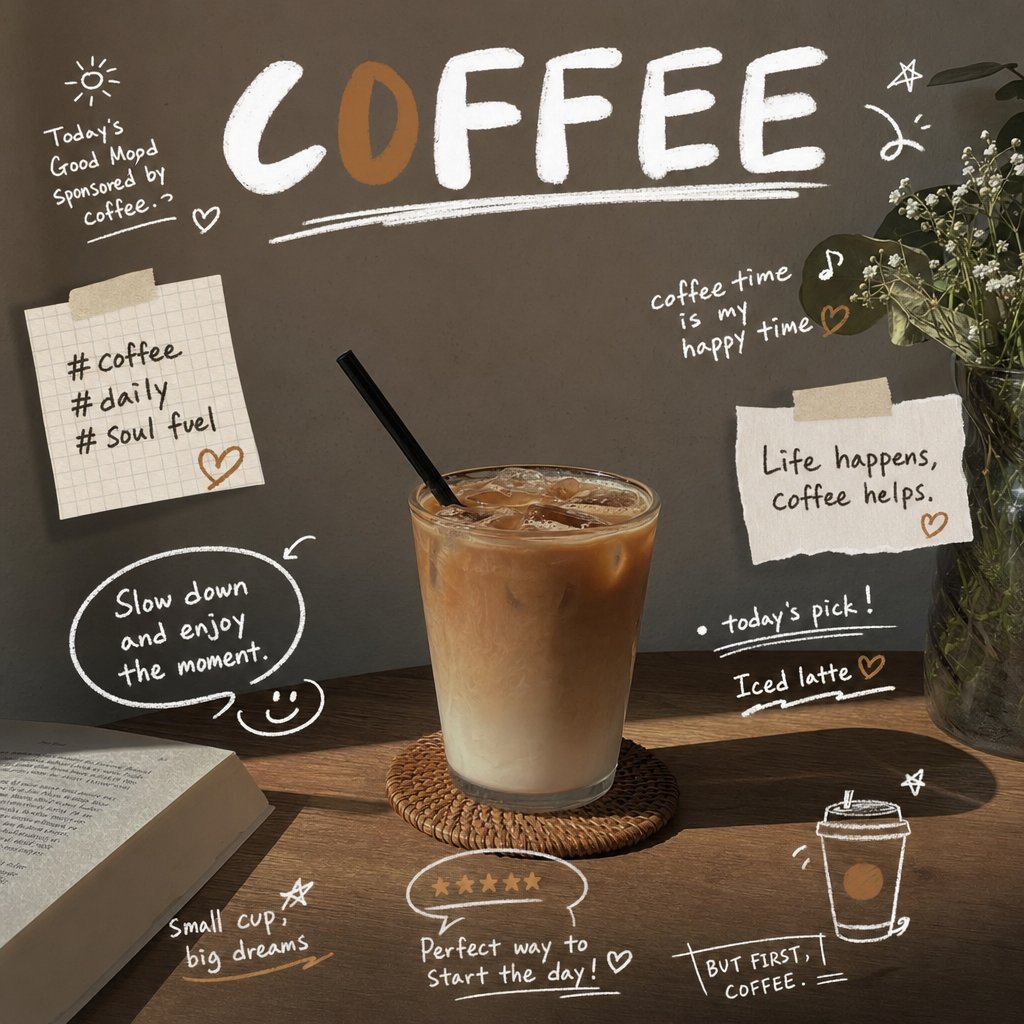
Generate an SNS-style image that combines magazine-style design with realistic handwritten decorations for a chosen photo subject. Do not place any text or decoration over the main subject of the photo. Use a dark moody background, large bold title typography, scattered handwritten annotations, hashtags, and star/heart doodles. Subject: Iced latte coffee on a café table.
The Results
This is where the gap between GPT Image 2 and Nano Banana 2 becomes immediately visible. The SNS coffee design test is a perfect stress test for both text rendering accuracy and spatial compositional awareness — two capabilities that define a reliable AI image generator for social media content creation.
GPT Image 2 produced a visually cohesive magazine-style layout with the bold “COFFEE” headline precisely placed, handwritten annotations like “Life happens, coffee helps” and “Iced latte” scattered naturally without overlapping the main subject. The hashtags (#coffee, #daily, #Soul fuel) were legible, correctly spelled, and stylistically consistent. The handwritten doodles — stars, hearts, small cups — felt intentional rather than random. Crucially, the model respected the spatial constraint of keeping the coffee glass entirely free of any overlay — a level of compositional discipline that few AI image generators can match.
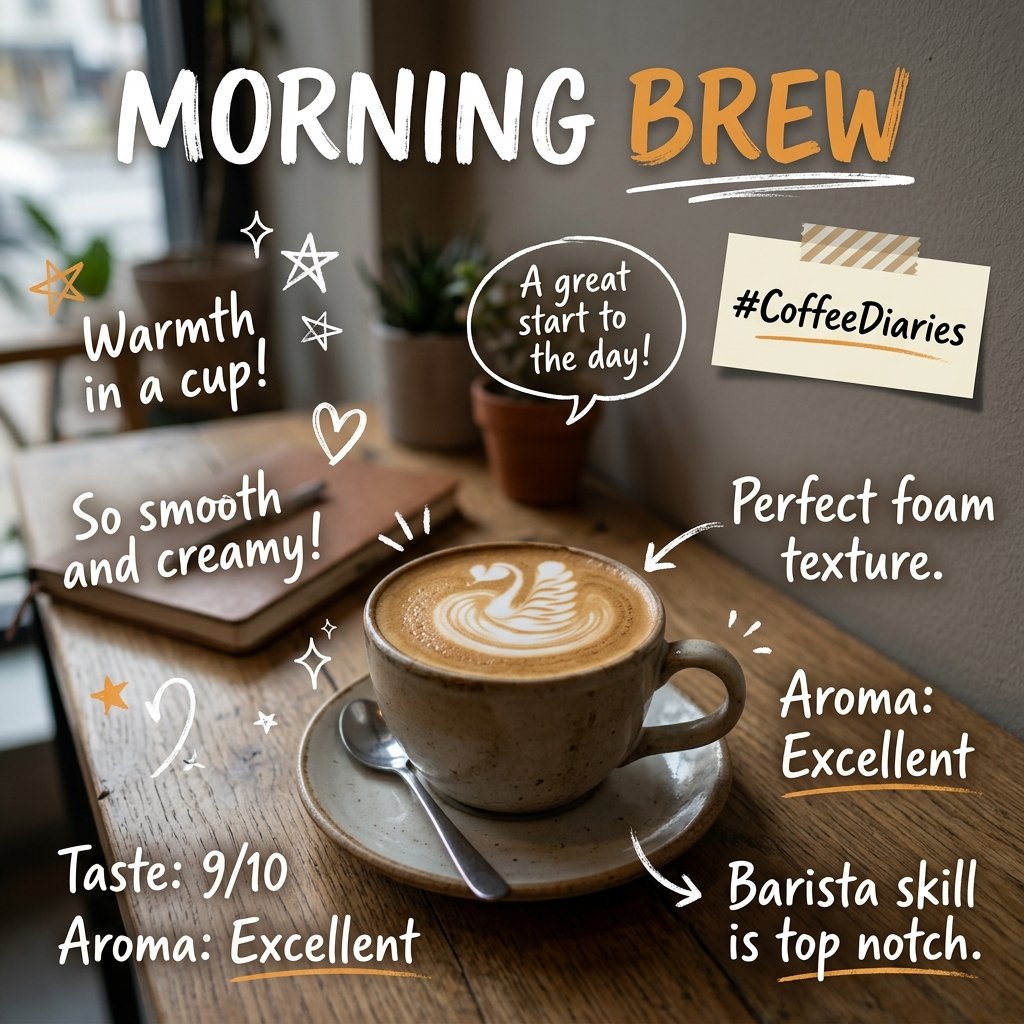
Nano Banana 2 delivered a warmer, more vibrant aesthetic with beautiful lighting on the latte art, but struggled with the compositional constraint. Several text elements drifted over the coffee subject, and some handwritten annotations were partially illegible. The “MORNING BREW” variant it produced showed strong typographic instinct but lacked the precise spatial discipline the prompt demanded.
Verdict
For SNS content creators, bloggers, and social media designers who need text-heavy, annotation-rich layouts, GPT Image 2 is the undisputed winner. Its ability to render handwritten-style text accurately while respecting spatial boundaries sets it apart as the top choice for structured AI social media content creation.
Round 2: Fashion Infographic — Structured Layout & Prompt Adherence
 |  |
The Prompt
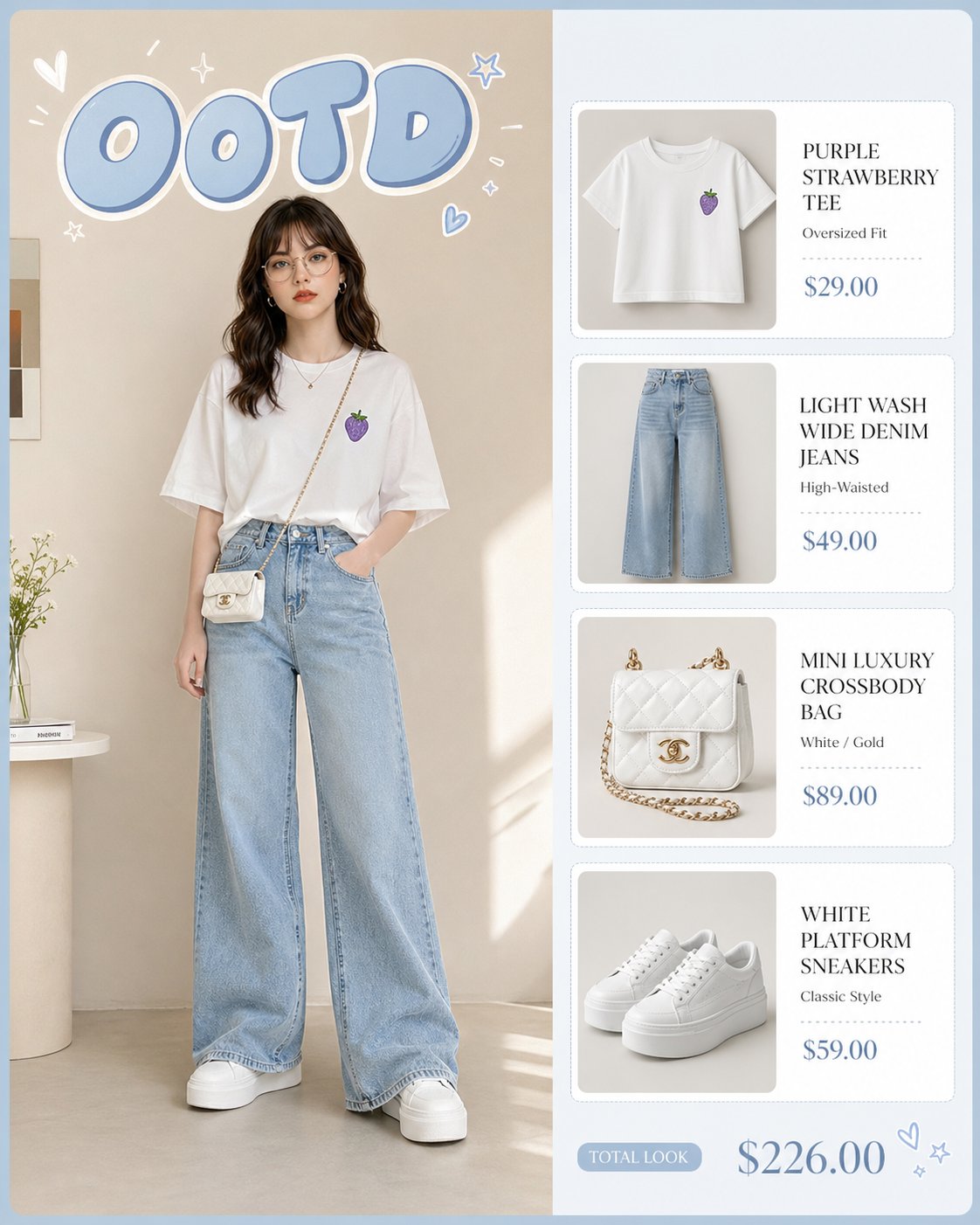
Generate a high-quality fashion infographic titled “OOTD” in soft pastel blue bubble letters. The layout is split: the left side features a full-body shot of a young woman posing in a minimalist indoor setting, wearing an oversized white t-shirt with a small purple strawberry graphic, light-wash high-waisted wide-leg denim jeans, and white platform sneakers. She carries a tiny white luxury crossbody bag. The right side features a vertical stack of four neat white product cards, each displaying a close-up of the individual items (shirt, jeans, bag, shoes) with elegant serif typography and price tags. The overall aesthetic is clean, bright, and inspired by Korean street fashion, using a muted beige and soft blue color palette. Ratio 4:5.
The Results
This prompt is a masterclass in testing AI image layout understanding — a multi-zone composition combining strict left/right division, character consistency, product card generation, and typographic requirements in a single frame. It is the definitive benchmark for any AI image generator claiming to handle professional design work.
GPT Image 2 executed this with architectural precision. The “OOTD” title appeared in correctly styled pastel bubble letters. The left-side character was rendered in the described outfit with accurate garment details — the purple strawberry graphic on the tee was present and correctly scaled. The right side featured four clean product cards with serif typography and plausible price tags ($29.00, $49.00, $89.00, $59.00). The beige-and-blue palette was maintained throughout. This is the kind of output a professional designer could use as a direct mockup reference for an e-commerce lookbook or fashion infographic.
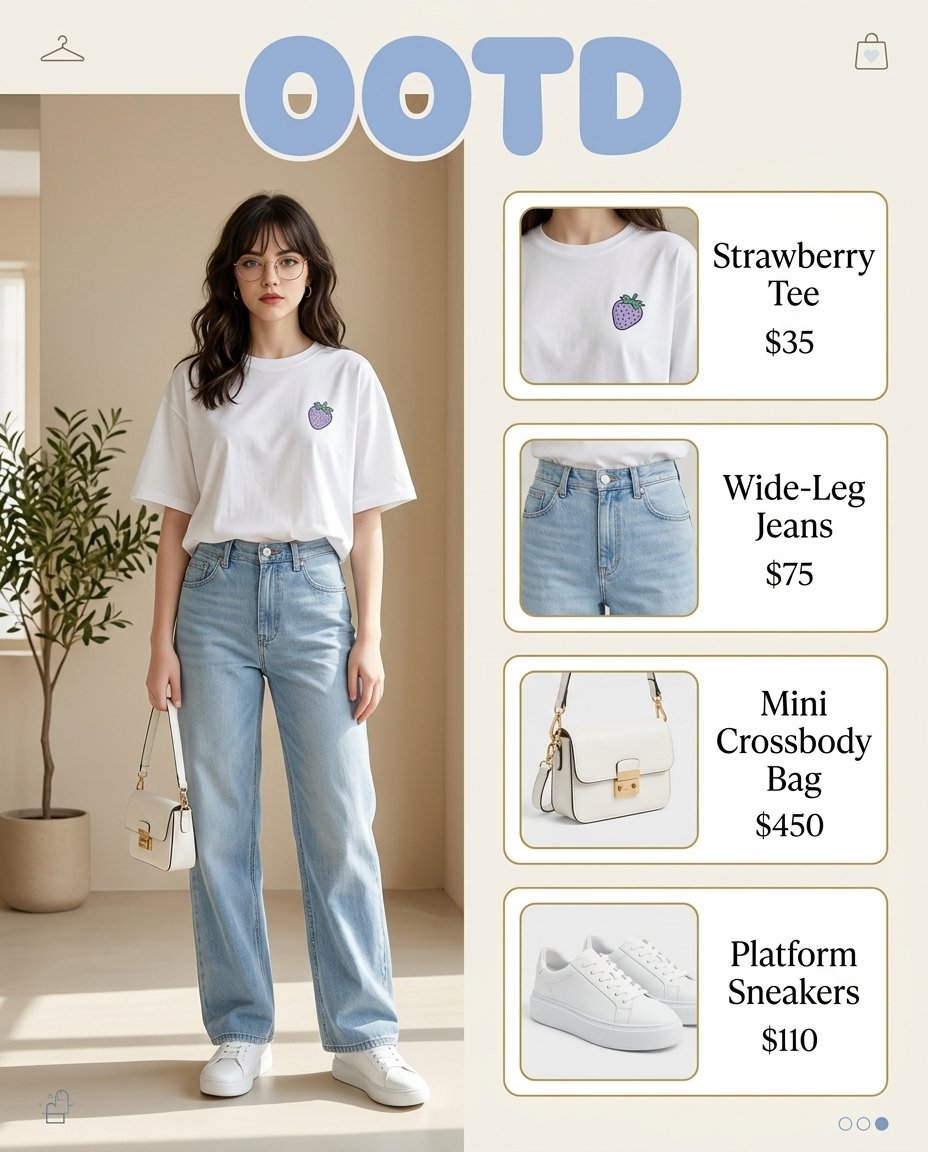
Nano Banana 2 produced a visually appealing result with better skin realism and softer lighting on the model, but the structural discipline broke down. The product cards on the right were inconsistently sized, the “OOTD” lettering lacked the bubble-style quality, and one price tag was missing entirely. It treated the prompt as a mood reference rather than a precise design specification.
Verdict
For e-commerce designers, fashion content creators, and anyone building structured visual content like lookbooks or product infographics, GPT Image 2’s prompt adherence makes it the only professional-grade choice. The ability to generate a complete, publication-ready layout from a single detailed prompt is a genuine competitive advantage that Nano Banana 2 currently cannot replicate.
Round 3: Cinematic Street Portrait — Photorealism & Atmospheric Lighting
 |  |
The Prompt
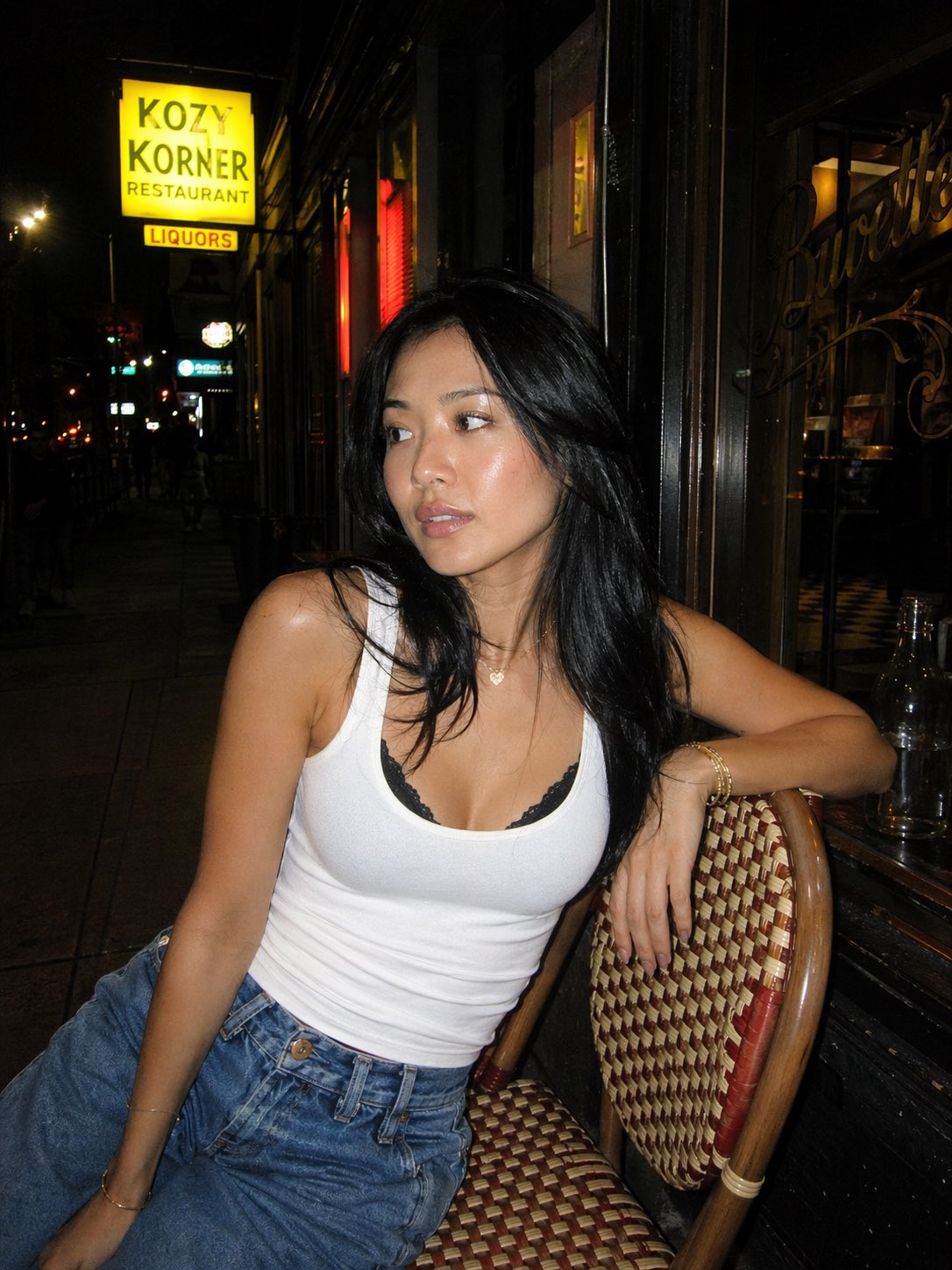
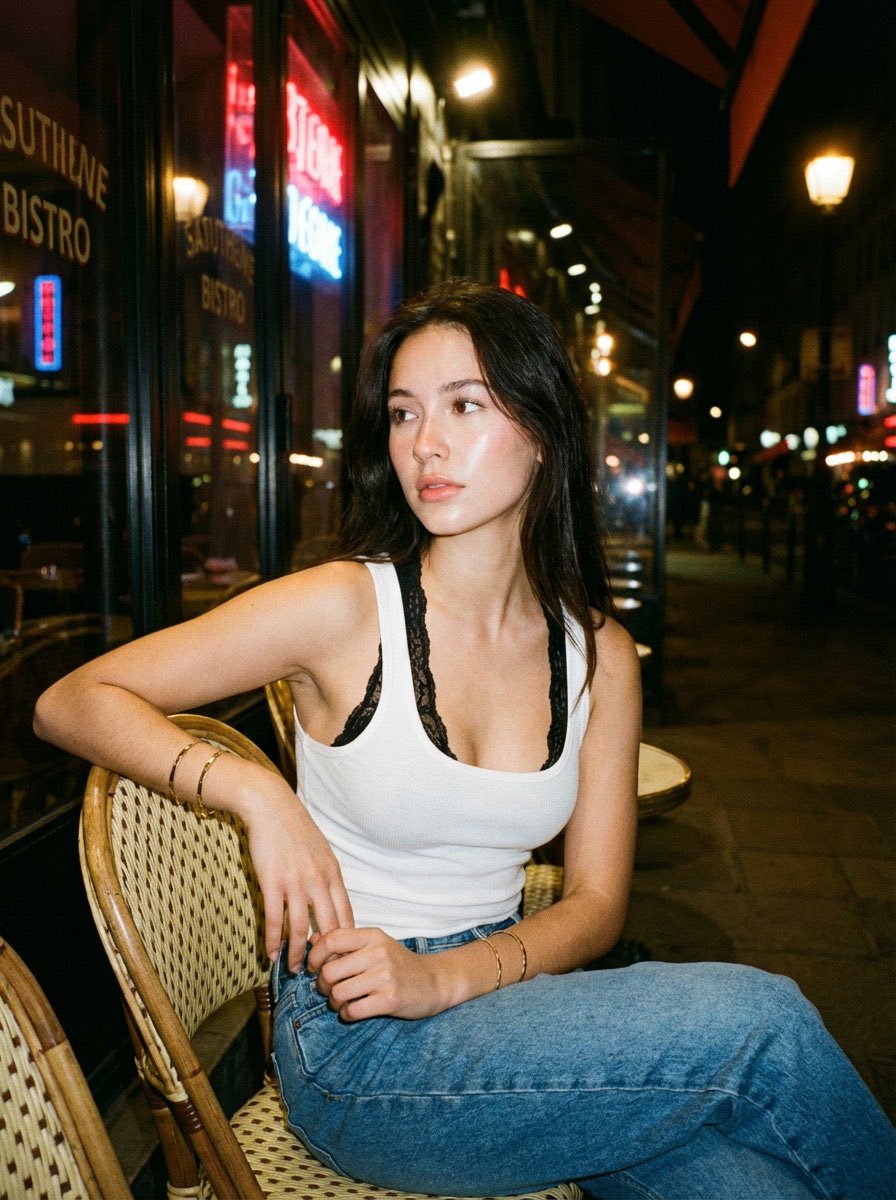
A candid nighttime street portrait of a young woman sitting casually on a woven café chair outside a small urban restaurant. She has long black hair, natural makeup with a soft glow, and wears a white tank top layered over a black lace bralette, paired with relaxed denim jeans. She leans slightly to the side with one arm resting on the chair, looking off-camera with a calm, introspective expression. Subtle accessories include thin gold bracelets and a delicate necklace. The scene is lit with a direct flash, creating sharp highlights on her skin and a contrast against the dark street background. Neon signs and reflections from glass windows add pops of color, while the sidewalk and storefront create an authentic city nightlife vibe. Medium shot, shallow depth of field, film-like grain, flash photography aesthetic, raw and unfiltered mood, stylish yet natural composition.
The Results
This round flips the scoreboard entirely. When the goal is photorealistic AI portrait generation with cinematic atmosphere, Nano Banana 2 operates in a different league.
Nano Banana 2 produced two variants that felt genuinely indistinguishable from a professional street photography session. The flash lighting created authentic skin highlights with realistic specular falloff. The shallow depth of field blurred the neon-lit background in a way that felt optically accurate rather than algorithmically approximated. The film grain was subtle and consistent, the gold jewelry caught the light correctly, and the model’s expression carried the introspective quality the prompt described. This is the kind of output that could appear in an editorial magazine without raising questions.
GPT Image 2 delivered a technically correct portrait — the outfit, setting, and composition were all accurately represented — but it lacked the tactile, atmospheric quality of Nano Banana 2’s output. The skin rendering felt slightly smoother and more “digital,” the neon reflections were present but flatter, and the overall mood, while competent, didn’t carry the raw, unfiltered energy the prompt called for.
Verdict
For photographers, lifestyle content creators, influencers, and anyone producing editorial-style visuals, Nano Banana 2 is the superior tool. Its ability to simulate real-world lighting physics and film aesthetics — flash falloff, neon reflections, shallow depth of field — is simply better than GPT Image 2 in this category.
Full Scorecard: GPT Image 2 vs Nano Banana 2
Test Category | Winner | Why It Matters |
|---|---|---|
Text Rendering Accuracy | GPT Image 2 | 99%+ accuracy across titles, handwritten notes, and hashtags — essential for any text-heavy AI image design workflow |
Structured Layout Adherence | GPT Image 2 | Executes multi-zone compositions, grid logic, and spatial boundaries with architectural precision |
Photorealism & Skin Detail | Nano Banana 2 | Superior lighting simulation and texture depth — the benchmark for photorealistic AI portrait generation |
Cinematic Atmosphere | Nano Banana 2 | Film grain, neon reflections, and shallow depth of field feel optically authentic, not algorithmic |
Color Accuracy | GPT Image 2 | Neutral, true-to-prompt color reproduction — ideal for branded design work requiring precise color matching |
Vibrance & Aesthetic Appeal | Nano Banana 2 | Richer, more stylized color grading that enhances mood for lifestyle and editorial content |
Generation Speed | Tie | Both deliver results in 2–5 seconds — negligible difference for most creative workflows |
Complex Prompt Comprehension | GPT Image 2 | Follows multi-layered, multi-element instructions precisely, turning detailed prompts into polished structured designs |
Which AI Image Generator Should You Choose?
The answer depends entirely on your creative workflow and output requirements.
Choose GPT Image 2 if you are designing social media content with text overlays, building fashion infographics or e-commerce lookbooks, creating UI mockups or product catalog layouts, or working on any project where the exact wording inside the image must be correct. GPT Image 2’s strength in AI image text rendering and structured layout generation makes it the go-to tool for designers, marketers, and content strategists who need precision over aesthetics.
Choose Nano Banana 2 if you are producing lifestyle photography, editorial portraits, influencer content, or any visual where photorealistic skin detail, authentic flash lighting, and cinematic atmosphere matter more than structural precision. Its ability to simulate real-world photographic conditions — film grain, neon reflections, specular falloff — is genuinely impressive and difficult to replicate with other models.
The smartest move? Use both. Different projects demand different strengths. Use GPT Image 2 to design your branded social media graphics and product infographics, then switch to Nano Banana 2 for your lifestyle portrait content and editorial mood boards — getting the best of both worlds without compromise.
👉 Start Generating with GPT Image 2
How to Get Started with GPT Image 2
Getting started is straightforward — no design background required.
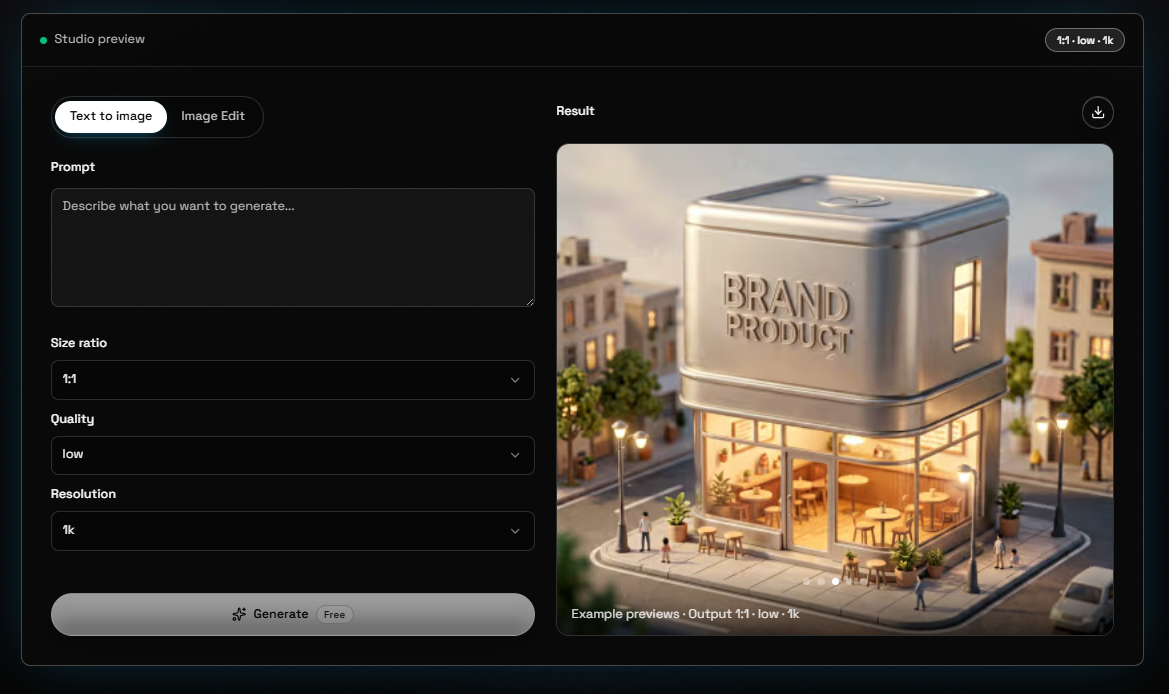
Visit gptimage.tools/generator and open the image generator.
Type your prompt in plain English — describe your subject, style, layout, and any text you want included.
If you are unsure how to phrase your prompt, use the built-in Enhance Prompt feature to refine your idea automatically.
Select your preferred output ratio (1:1 for social posts, 4:5 for fashion infographics, 16:9 for banners).
Generate, review, and download — your image is ready for immediate use.
No account setup, no Discord server, no waitlist. Open the tool and start creating.
Final Verdict
GPT Image 2 vs Nano Banana 2 does not have a single winner — it has two specialists. GPT Image 2 is the architect: precise, disciplined, and exceptional at turning complex instructions into structured, text-accurate visual designs. It is the top choice for designers, marketers, and content strategists who need control over layout and typography.
Nano Banana 2 is the photographer: atmospheric, emotive, and capable of producing photorealistic imagery that feels genuinely captured rather than generated. Powered by Google DeepMind’s Gemini 3.1 Flash Image technology, it is ideal for content creators, photographers, and anyone who prioritizes aesthetic richness and cinematic quality over structural precision.
For creators who need both capabilities, the answer is not to choose — it is to use each model where it naturally excels. Start with GPT Image 2 for your design-forward, text-heavy projects, and reach for Nano Banana 2 when the brief calls for cinematic realism and atmospheric depth.
The best AI image generator is the one that fits the task. Now you know exactly which one to reach for.
👉 Generate Your First Image with GPT Image 2
Frequently Asked Questions
Is GPT Image 2 better than Nano Banana 2 in 2026?
Neither model is universally better. GPT Image 2 dominates text rendering and structured layout adherence, while Nano Banana 2 leads in photorealism, skin detail, and cinematic lighting quality. The right choice depends entirely on your creative task — precision design versus atmospheric photography.
Which is better for SNS design: GPT Image 2 or Nano Banana 2?
GPT Image 2 is the clear choice for SNS content creation. It delivers accurate typography, clean handwritten annotations, and strict spatial layout control without overlapping key subjects — making it ideal for text-heavy social media graphics and annotated lifestyle images.
Does GPT Image 2 generate accurate text inside images?
Yes. GPT Image 2 achieves 99%+ text rendering accuracy for titles, handwritten notes, hashtags, and custom typography — far more reliable for design work than most other AI image generators currently available.
What is Nano Banana 2 best used for?
Nano Banana 2 excels at photorealistic portraits, lifestyle photography, cinematic scenes, and editorial-style visuals with natural lighting and film grain effects. Powered by Google DeepMind’s Gemini 3.1 Flash Image technology, it produces images that feel captured rather than generated.
Which model is better for fashion infographics and AI lookbook generation?
GPT Image 2 is the stronger choice. It follows split layouts, generates product cards, renders custom lettering, and maintains color palettes with precise prompt adherence — making it the top AI image generator for structured fashion content and e-commerce mockups.
Can Nano Banana 2 handle structured design layouts?
Nano Banana 2 prioritizes aesthetic quality over strict layout rules. It excels at mood-driven portraits and lifestyle visuals but struggles with multi-zone grid designs and exact typography requirements. For structured layouts, GPT Image 2 is the more reliable option.
Where can I try GPT Image 2 for free?
You can generate AI images instantly with GPT Image 2 at gptimage.tools/generator — no complicated account setup or waiting required.
Can I use images generated by GPT Image 2 or Nano Banana 2 commercially?
Yes. Images generated with both GPT Image 2 and Nano Banana 2 can generally be used for personal and commercial purposes. Always review each platform’s Terms of Service for specific licensing details applicable to your use case.
Do I need design skills to use GPT Image 2 or Nano Banana 2?
No. Both models are designed for users of all skill levels. Simply describe your vision in plain English and the AI handles the rest. GPT Image 2 also includes an Enhance Prompt feature that helps you refine vague ideas into detailed, generation-ready prompts — making it especially beginner-friendly.
Try GPT Image 2.5 on your own prompt
Open the free generator and turn ideas into images in seconds.
Open Generator